Inhaltsangabe
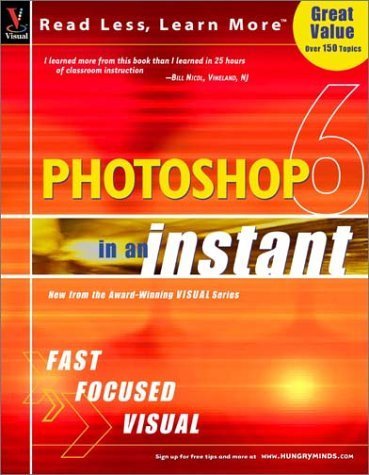
Using the award-winning Visual learning system, this compact, value-priced guide visually shows you how to get up and running on the core program features in Photoshop 6 -- focusing on the features you'll use over and over again. Concise, step-by-step instructions and consistent placement of elements makes the essential Photoshop 6 tasks fast and easy to learn. Photoshop 6 in an Instant covers the most popular features of Photoshop 6, including color management, using palettes, compositing, suing layers, applying gradients, and setting type and filters.
Die Inhaltsangabe kann sich auf eine andere Ausgabe dieses Titels beziehen.
Über die Autorin bzw. den Autor
<b>Michael S. Toot</b> is an author and software program manager in the Seattle area. He is an MCSE and MCP+I and has been involved with Microsoft operating systems since 1992. He has written a book on Windows 2000 Server and enjoys learning new programs and operating systems, even those not from Microsoft. When not working or writing books, he is reading, sailing, writing movie reviews, fiction, and nonfiction, and conducting adventures in home renovation and repair on his ninety-three year old home. <p> gt; Mike Wooldridge</b> has worked as an independent Web developer, technology writer, and educator since 1995, and has been using Dreamweaver since version 1.0, and because of its exceptional support for handling large web sites, uses it as his primary tool for maintaining client web sites. He's written about Web technology for various publications, including <I>Macworld, CNET</I> and <I>MacHome Journal</I>. His articles have covered Web design, graphics and multimedia.
Von der hinteren Coverseite
"I will always buy your books because thay are the best" —Seward Kollie (Dakar, Senegal)
"Thank you for making it clear. Keep up the good work." – Kirk Santoro (Burbank, CS)
Read Less — Learn More
Are you a visual learner who needs results – right away? Do you prefer to focus on the essentials – and skip the bells and whistles? If so, then this book is for you. Open it up and you′ll find extra–large, step–by–step screen shots that show you how to tackle over 100 key Photoshop 6 tasks, from using the Airbrush tool and reordering layers to applying a Texture filter and adding type to an image.
- Fast coverage of the essentials helps you get right to work
- Focused two–page lessons cover a single task
- Visual format shows you step by step how it′s done
Aus dem Klappentext
"I will always buy your books because thay are the best" --Seward Kollie (Dakar, Senegal)
"Thank you for making it clear. Keep up the good work." - Kirk Santoro (Burbank, CS)
Read Less -- Learn More Are you a visual learner who needs results - right away? Do you prefer to focus on the essentials - and skip the bells and whistles? If so, then this book is for you. Open it up and you'll find extra-large, step-by-step screen shots that show you how to tackle over 100 key Photoshop 6 tasks, from using the Airbrush tool and reordering layers to applying a Texture filter and adding type to an image. * Fast coverage of the essentials helps you get right to work * Focused two-page lessons cover a single task * Visual format shows you step by step how it's done
„Über diesen Titel“ kann sich auf eine andere Ausgabe dieses Titels beziehen.
Suchergebnisse für Photoshop 6 in an Instant (Visual Read Less, Learn...

Beispielbild für diese ISBN
Photoshop 6 in an Instant
Verlag:
Wiley & Sons, Incorporated, John, 2001
ISBN 10: 076453629X
ISBN 13: 9780764536298
Gebraucht
Softcover
Anbieter: Better World Books, Mishawaka, IN, USA
Verkäuferbewertung 5 von 5 Sternen

Zustand: Very Good. Used book that is in excellent condition. May show signs of wear or have minor defects. Artikel-Nr. 48985183-6
Gebraucht kaufen
EUR 6,04
Versand gratis
Versand innerhalb von USA
Versand innerhalb von USA
Anzahl: 1 verfügbar
Beispielbild für diese ISBN
Photoshop 6 in an Instant
Verlag:
Wiley & Sons, Incorporated, John, 2001
ISBN 10: 076453629X
ISBN 13: 9780764536298
Gebraucht
Softcover
Anbieter: Better World Books, Mishawaka, IN, USA
Verkäuferbewertung 5 von 5 Sternen
Zustand: Good. Used book that is in clean, average condition without any missing pages. Artikel-Nr. 3454765-6
Gebraucht kaufen
EUR 6,04
Versand gratis
Versand innerhalb von USA
Versand innerhalb von USA
Anzahl: 1 verfügbar
Foto des Verkäufers
Photoshop® 6 In an Instant
Anbieter: WeBuyBooks, Rossendale, LANCS, Vereinigtes Königreich
Verkäuferbewertung 5 von 5 Sternen
Zustand: Good. Most items will be dispatched the same or the next working day. A copy that has been read but remains in clean condition. All of the pages are intact and the cover is intact and the spine may show signs of wear. The book may have minor markings which are not specifically mentioned. Ex library copy with usual stamps & stickers. Artikel-Nr. wbs2771877920
Gebraucht kaufen
EUR 1,62
EUR 7,06 shipping
Versand von Vereinigtes Königreich nach USA
Versand von Vereinigtes Königreich nach USA
Anzahl: 1 verfügbar
Beispielbild für diese ISBN
Photoshop 6 in an Instant
Anbieter: AwesomeBooks, Wallingford, Vereinigtes Königreich
Verkäuferbewertung 5 von 5 Sternen
Paperback. Zustand: Very Good. Photoshop 6 in an Instant This book is in very good condition and will be shipped within 24 hours of ordering. The cover may have some limited signs of wear but the pages are clean, intact and the spine remains undamaged. This book has clearly been well maintained and looked after thus far. Money back guarantee if you are not satisfied. See all our books here, order more than 1 book and get discounted shipping. Artikel-Nr. 7719-9780764536298
Gebraucht kaufen
EUR 4,06
EUR 5,73 shipping
Versand von Vereinigtes Königreich nach USA
Versand von Vereinigtes Königreich nach USA
Anzahl: 2 verfügbar
Beispielbild für diese ISBN
Photoshop 6 in an Instant
Anbieter: Bahamut Media, Reading, Vereinigtes Königreich
Verkäuferbewertung 5 von 5 Sternen
Paperback. Zustand: Very Good. This book is in very good condition and will be shipped within 24 hours of ordering. The cover may have some limited signs of wear but the pages are clean, intact and the spine remains undamaged. This book has clearly been well maintained and looked after thus far. Money back guarantee if you are not satisfied. See all our books here, order more than 1 book and get discounted shipping. Artikel-Nr. 6545-9780764536298
Gebraucht kaufen
EUR 4,06
EUR 8,01 shipping
Versand von Vereinigtes Königreich nach USA
Versand von Vereinigtes Königreich nach USA
Anzahl: 2 verfügbar